Dual Pricing Programs: Quantic POS vs Square, Clover, and Lightspeed


Table of Content
- What is Dual Pricing?
- What is Credit Card Surcharging
- Why Dual Pricing Matters in the USA
- Understanding Dual Pricing on Quantic POS QST
- Dual Pricing Program Comparison with Top POS Software in the USA
- Why Choose Quantic POS for Dual Pricing?
- 1. True Dual Pricing with Two Prices Displayed Upfront
- 2. Processor Freedom to Negotiate the Best Rates
- 3. Automated Price Calculations to Reduce Errors
- 4. Dedicated Customer Display Increases Transparency
- 5. Built-In Compliance Tools to Reduce Legal Risks
- 6. Smooth, User-Friendly Experience for Staff and Customers
- Conclusion: Why Quantic POS is the Smart Choice for US Merchants
- Frequently Asked Questions
- What is dual pricing?
- Is it legal in the USA?
- How does Quantic POS support dual pricing?
- Can I apply a surcharge only to credit card transactions with Quantic POS?
- How does Quantic POS compare to Square POS regarding dual pricing?
- Does Clover POS support dual pricing like Quantic POS?
- Can I use any payment processor with Quantic POS?
- Does Quantic POS help with legal compliance for surcharging?
- Is dual pricing beneficial for small businesses?
As businesses face credit card processing fees, finding ways to reduce or offset these costs has become essential.
A successful strategy is to use dual pricing programs or credit card surcharging, where companies show different prices for cash and card payments.
This method helps companies encourage cash payments and recover card transaction fees.
Dual pricing and surcharging are permitted in the US, but companies must carefully follow certain rules.
Although various Point of Sale (POS) systems provide resources to assist retailers in implementing these programs, their features, usability, and compliance support differ greatly.
In this blog, we’ll take an in-depth look at four popular POS systems:
- Quantic POS
- Square POS
- Clover POS
- Lightspeed POS
Comparing their strategies for credit card surcharging and dual pricing, we’ll show how Quantic POS’s Dual Pricing Program is better in terms of transparency, flexibility, and compliance.
What is Dual Pricing?
Dual pricing means a merchant displays two different prices for the same item or service:
- A lower price if you pay with cash (or sometimes a debit card)
- A higher price if you pay using a credit or debit card
Customers who opt to pay with a credit or debit card are directly charged for the processing fees. For instance, a coffee shop may display:
- $3.00 for cash payments
- $3.25 if paying by card
How Does It Work?
- Both prices are prominently displayed up front on the merchant’s menus, price tags, and signage.
- Depending on the cost difference, customers can choose which payment method to use.
- It is clear why card payments are more expensive because of this transparency.
Benefits:
- Transparency: Clients understand why prices vary depending on the payment method.
- Promotes cash payments, saving businesses money by avoiding the fees that card networks charge.
- Businesses with set prices and visible menus and prices will find it easy to implement.
What is Credit Card Surcharging
Adding an additional fee or a percentage to the purchase price only when the customer pays with a credit card is known as credit card surcharging.
For example, if a shirt costs $50, and the merchant adds a 3% surcharge on credit card payments, a customer paying with a credit card will pay $51.50.
How Does It Work?
- The surcharge is added at the point of sale (checkout).
- The additional cost is meant to cover the merchant’s card processing fees, which can range from 1.5% to 3.5% or more per transaction.
- The fee must be disclosed before the customer completes the purchase.
Benefits:
- Enables businesses to recover the full cost of processing credit cards without raising prices for all consumers.
- Easier for companies that don’t want to display two prices up front.
- Customers can still use their cards to make purchases, but they are informed of the additional fee up front.
Why Dual Pricing Matters in the USA
Depending on the card network and type, card processing fees usually vary from 1.5% to 3.5% or higher per transaction.
Particularly for small businesses and those with narrow profit margins, these fees can drastically reduce profits.
Although it is possible to absorb these fees, many businesses would rather pass along some or all of the costs to their credit card customers.
The following reasons make the dual pricing model popular:
- It promotes price transparency to customers upfront.
- It incentivizes cash payments, which have lower fees.
- It helps merchants comply with state laws regulating surcharging.
- It aligns with card network rules when implemented properly.
Understanding Dual Pricing on Quantic POS QST
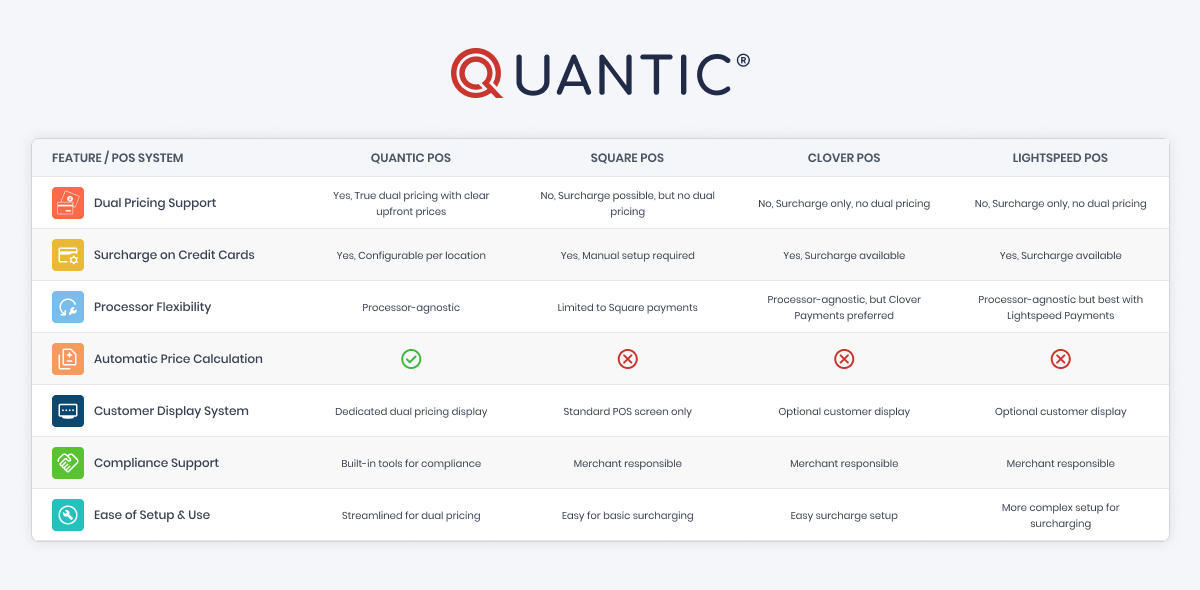
Dual Pricing Program Comparison with Top POS Software in the USA
Quantic POS: A Leader in Dual Pricing Programs
Effective cost management is essential in today’s competitive retail and service sectors.
One unique solution made to make dual pricing and credit card surcharging easier to implement and manage is Quantic POS.
Here’s a detailed look at why Quantic POS is the industry leader:
1. True Dual Pricing Support
The majority of point-of-sale (POS) systems that claim to manage surcharging simply add a fee at the point of payment.
By providing true dual pricing capabilities, Quantic POS goes one step further and shows two prices up front for the same good or service:
- A cash price, which is typically lower
- A card price, which includes the surcharge or processing fee
This dual pricing is visible in multiple touchpoints:
- On the merchant’s POS screen, for easy reference and clarity
- On a dedicated customer-facing display, shoppers can see the price difference in real-time
- On printed receipts, ensuring transparency even after purchase
Quantic POS reduces friction and customer dissatisfaction with payment fees by displaying prices up front, eliminating surprises at checkout, and building trust with customers.
2. Processor-Agnostic Flexibility
Many point-of-sale systems lock retailers into a specific payment processor, making it difficult to compare prices or switch providers quickly.
Because Quantic POS is processor-agnostic,
- It allows smooth integration with numerous payment processors.
- Merchants can switch processors or negotiate freely without compromising their pricing structure or functionality.
For companies looking to minimize transaction costs and avoid vendor lock-in, this flexibility is a major benefit.
3. Automatic Price Calculations
Depending on the surcharge model you select, Quantic POS automates the difficult process of changing prices.
Whether you prefer:
- A percentage-based surcharge (e.g., 3% extra on card payments)
- A flat fee surcharge (e.g., $0.30 extra per card transaction)
The system:
- Determines and updates the card price for every good or service automatically.
- Eliminates the need for retailers to make distinct SKUs for cash and card pricing or manually override prices.
In addition to saving setup time and minimizing human error, this automation ensures pricing uniformity across all sales channels.
4. Customer Display System (CDS)
Quantic POS has a Customer Display System designed specifically to:
- At checkout, display the prices for both cash and cards.
- Highlight the price difference so that buyers are aware of the savings or surcharge.
- Increased transparency reduces misunderstandings and complaints regarding pricing and enhances the overall customer experience.
Businesses can maintain positive customer relations while fairly passing on processing costs.
5. Built-In Compliance Support
Different legal and card network regulations, which can differ by jurisdiction, apply to dual pricing and surcharging.
Businesses can maintain compliance with Quantic POS by:
- Having options for clear signage within the system to inform clients in advance of surcharges or dual pricing.
- Making sure receipt disclosures adhere to card network regulations and state laws to prevent fines or penalties.
- Keeping the merchant informed about compliance best practices.
Businesses can confidently use dual pricing without regulatory issues, thanks to this integrated compliance support.
6. Streamlined User Experience
Quantic POS prioritizes ease of operation and efficiency from the first setup to day-to-day operations:
- Simple setup for flat fees or surcharge percentages.
- Staff can handle payments with little training due to an intuitive interface.
- Smooth transition between card and cash prices without interfering with the checkout process.
- Transparent pricing that benefits both customers and merchants.
Businesses can focus on customer service and sales instead of complicated payment management due to this seamless user experience, which also reduces operational headaches.
Square POS: Limited Dual Pricing Options
Square’s user-friendliness and clear flat-rate pricing have made it a huge favorite among small businesses.
However, in terms of dual pricing:
1. No Native Dual Pricing Support
Square does not allow for the upfront display of two prices.
Although it must be done manually, merchants add a convenience fee or surcharge to credit card transactions; this is not reflected in the initial price.
2. Limited to Square Payments
Square POS restricts the choice of payment processors, only processing payments through Square’s ecosystem.
3. Manual Surcharge Setup
Compliance is entirely the merchant’s responsibility, and adding surcharges requires manual labor.
Square does not automate or enforce the law, but it does provide guidelines for dual pricing and surcharging.
4. No Dedicated Customer Display
Square uses a standard point-of-sale screen, but it lacks a separate display that faces the customer to show dual pricing.
Clover POS: No True Dual Pricing
Clover POS, which offers a range of hardware and software options, is extensively utilized in the retail and hospitality industries.
1. Surcharging Available
Clover allows credit card transactions to have a surcharge added, typically up to 3%.
This ensures the recovery of processing fees for merchants.
2. No True Dual Pricing
Showing two different prices up front (cash vs. card) is not natively supported by Clover.
Surcharges are visible on the receipt or as an extra line item at checkout.
3. Processor Flexibility
Numerous features are tailored for Clover Payments, which may restrict options even though Clover hardware is compatible with a wide range of processors.
4. Optional Customer Displays
Although Clover provides hardware options with customer-facing displays, this pricing transparency is not usually achieved with these.
Lightspeed POS: Manual Surcharging
Lightspeed is well-known for its robust restaurant and retail management features.
1. Surcharging Support
It is possible to add a credit card surcharge at checkout with Lightspeed. But it needs to be configured and managed manually.
2. No Built-In Dual Pricing
Lightspeed does not allow different prices to be shown upfront depending on the method of payment.
3. Processor Agnostic with Limitations
Although Lightspeed is compatible with various payment processors, it frequently functions best with Lightspeed Payments, which may reduce flexibility.
4. Customer Display Options
Lightspeed provides customer display hardware, but it does not support the integrated dual pricing capability necessary to utilize these displays.
Why Choose Quantic POS for Dual Pricing?
Businesses can manage the growing expenses of credit card processing fees while maintaining compliance and transparency by implementing a pricing strategy.
But not every point-of-sale system is capable of managing all the details involved.
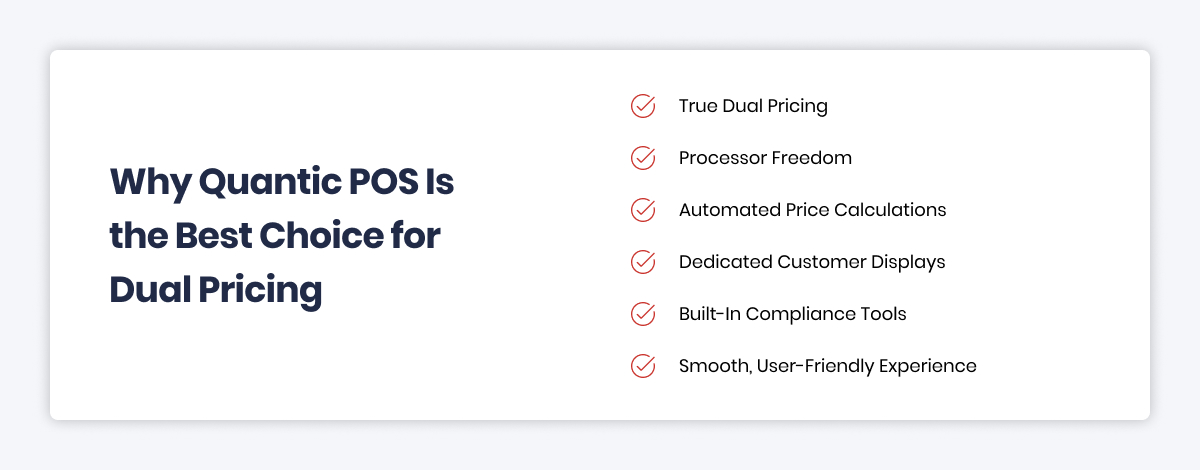
Because it handles every important aspect of pricing with unparalleled accuracy and simplicity, Quantic POS stands out as a top option for companies in the USA. This is the reason:
1. True Dual Pricing with Two Prices Displayed Upfront
Quantic POS fully supports true dual pricing by displaying both the cash price and the card price up front across all customer touchpoints, in contrast to many POS systems that merely add surcharges at checkout:
- On the merchant’s POS screen
- On the customer-facing display during checkout
- On printed receipts
This upfront display fosters pricing transparency, eliminates customer guesswork, and increases trust.
Customers can see the cost difference straight away, allowing them to make fair and informed payment decisions that can enhance customer satisfaction and reduce disputes.
2. Processor Freedom to Negotiate the Best Rates
You are not dependent on any one payment processor because Quantic POS is processor-agnostic. This provides merchants with the essential flexibility to:
- Shop around for competitive payment processing rates.
- Switch providers easily if better options become available.
- Avoid vendor lock-in that can lead to higher fees or subpar service.
This flexibility helps safeguard your margins over time by ensuring that your pricing strategy is both economical and successful.
3. Automated Price Calculations to Reduce Errors
It can be time-consuming and error-prone to manually change prices or create distinct products for cash and card payments. Quantic POS automates the entire process as :
- Use your configured surcharge percentage or flat fee to calculate the card price.
- Automatically updating prices in real time during each transaction
- Eliminating the need for manual overrides or complex workarounds
This automation ensures accuracy, significantly lowers the possibility of human error, and saves employees crucial time during peak hours.
4. Dedicated Customer Display Increases Transparency
During checkout, the Quantic POS system ensures that a dedicated Customer Display System (CDS) displays prices for both cash and cards. This functionality:
- Communicates price differences directly to customers
- Minimizes misunderstandings and possible confusion regarding prices at the point of sale
- Increases overall transparency, strengthening client satisfaction and trust.
Additionally, a visible customer display helps meet legal requirements for surcharge disclosure, which is essential for compliance.
5. Built-In Compliance Tools to Reduce Legal Risks
The US has complicated dual pricing and surcharging laws, with different states and card networks having different requirements.
To assist you in navigating this regulatory environment, Quantic POS does the following:
- Providing editable sign templates to ensure that pricing policies are communicated in-store
- Including receipt disclosures that follow or surpass state regulations and card network requirements
- Informing and updating merchants on best practices for compliance
By reducing the risk of fines, penalties, and legal issues, these tools help you execute dual pricing with confidence and responsibility.
6. Smooth, User-Friendly Experience for Staff and Customers
Using it shouldn’t make day-to-day tasks more difficult. To ensure an outstanding customer experience, Quantic POS does the following:
- Easy setup and configuration that requires minimal technical expertise
- Intuitive interfaces for quick staff training and hassle-free use
- Automatic switching between cash and card pricing based on payment method
- Faster checkout times without confusing extra steps or delays
Both your staff and clients have a seamless user experience, which raises customer satisfaction and operational effectiveness.
Conclusion: Why Quantic POS is the Smart Choice for US Merchants
Cost reduction and customer transparency are essential in today’s competitive marketplace.
The Dual Pricing Program from Quantic POS was developed specifically to meet these demands with unparalleled flexibility, automation, and clarity.
Quantic POS is the best point-of-sale system to help you achieve your objectives.
If you want to charge credit card fees to consumers, then provide transparent pricing options and maintain compliance with changing regulations.
Ready to upgrade your POS and implement a true dual pricing program?
Contact Quantic POS for a personalized demo and start saving on card processing costs today!