How to Use a POS System in a Restaurant in 2026 – A Comprehensive POS Guide

In today’s fast-paced restaurant industry, efficiency and accuracy are non-negotiable.
A Point of Sale (POS) system isn’t just a tool for processing payments; it’s the backbone of your restaurant’s operations.
From managing orders and tracking inventory to analyzing sales data and enhancing customer experiences, a modern POS system can revolutionize how you run your business.
But how do you leverage it effectively?
This comprehensive guide will walk you through everything you need to know about using a POS system in your restaurant, from setup to advanced features.
Whether you’re a new restaurateur or looking to optimize your current system, these actionable insights will set you up for success.
What is a Restaurant POS System?
A Point of Sale (POS) system for restaurants is a combination of hardware and software designed to streamline order processing, payment transactions, and overall restaurant management.
It acts as the central hub for taking orders, tracking sales, managing inventory, and enhancing customer service.
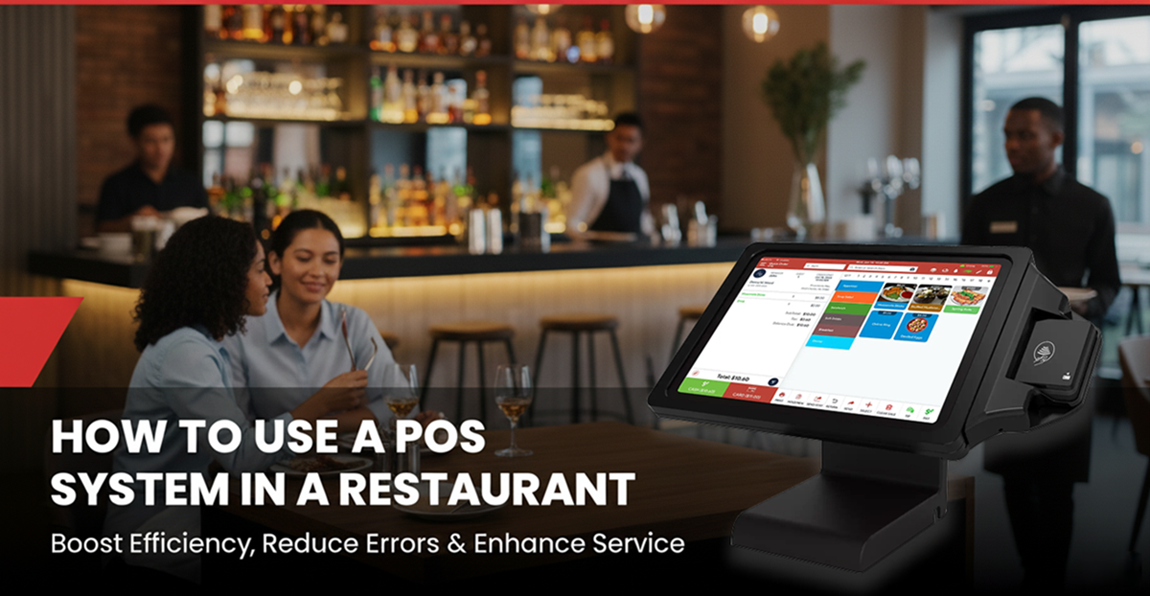
Modern restaurant POS systems typically include touchscreen terminals, kitchen display systems (KDS), receipt printers, cash drawers, and mobile ordering devices.
Many integrate with online ordering platforms, customer loyalty programs, and real-time inventory tracking to optimize operations.
Cloud-based POS solutions allow restaurant owners to monitor sales, track employee performance, and access business insights remotely.
Quantic POS System for Restaurants
Quantic POS is a modern, cloud-based Point of Sale (POS) system designed specifically for restaurants, bars, cafés, and food service businesses.
It offers a user-friendly interface, advanced automation, and seamless integration with various restaurant management tools.
With its robust features, Quantic POS helps restaurant owners streamline order management and payment processing while enhancing the overall customer experience.
Key Features of Quantic POS for Restaurants
Table & Order Management
- Supports dine-in, takeout, and delivery orders in a single system.
- Allows servers to assign tables, split bills, and manage reservations effortlessly.
- Enables table-side ordering with mobile devices, improving service speed.
Customizable Menu & Modifiers
- Easily create and edit menus with images, categories, and pricing.
- Supports modifiers for custom orders, dietary preferences, and special requests.
- Automated menu updates across multiple locations.
Integrated Payment Processing
- Accepts credit/debit cards, contactless payments, digital wallets (Apple Pay, Google Pay), and QR code payments.
- Secure transactions with PCI compliance and fraud protection.
Kitchen Display System (KDS) Integration
- Orders are instantly sent to the kitchen display screen, reducing miscommunication.
- Color-coded order statuses help kitchen staff manage priorities efficiently.
- Supports multi-kitchen routing for different food preparation stations (e.g., grill, bar, dessert station).
A Definitive Guide to Restaurant POS Systems: Selection, Setup, and Success
1. Understanding the Basics of a Restaurant POS System
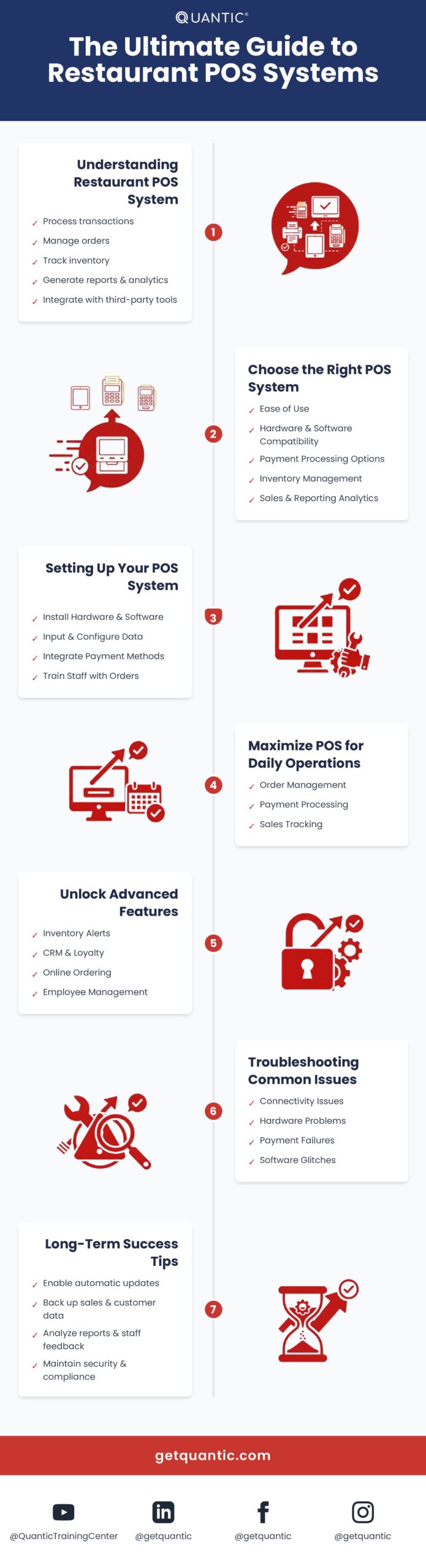
Before diving into implementation, it’s crucial to understand what a POS system does. At its core, a restaurant POS system:
- Process transactions (cash, credit/debit cards, digital wallets).
- Manages orders across dine-in, takeout, and delivery channels.
- Tracks inventory in real time.
- Generates sales reports and analytics.
- Integrates with third-party tools (e.g., accounting software, loyalty programs).
Modern systems are cloud-based, allowing access to data from any device, while traditional systems rely on on-site servers.
Cloud POS systems, like Quantic POS, are popular for their scalability and remote management capabilities.
2. Choosing the Right POS System for Your Restaurant
Not all POS systems are created equal. To select the best fit:
a) Assess Your Needs
Before selecting a POS system, evaluate the specific requirements of your restaurant. Consider the following factors:
Your business model significantly influences the type of POS system you need.
A quick-service food truck will have vastly different requirements compared to a full-service fine-dining restaurant.
- Food trucks and small cafes: Require mobile-friendly and compact POS systems with simple checkout functions.
- Casual dining and fast-food restaurants: Need fast order processing, kitchen display systems (KDS), and delivery integrations.
- Fine-dining establishments: Benefit from features like tableside ordering, reservation management, and detailed reporting.
- Bars and nightclubs: Require age verification tools and fast order input for liquor management.
b) Compare Popular Systems
- Quantic – A flexible and scalable POS solution suitable for restaurants, retail, and service-based businesses. It offers cloud-based technology, customizable features, and seamless integration with third-party applications.
- Toast: Ideal for full-service restaurants with robust reporting and loyalty program tools.
- Square for Restaurants: Affordable for small cafes or food trucks.
- Upserve: Focuses on sales growth through customer analytics.
c) Test the System
Quantic POS is available at affordable prices.
Take advantage of this opportunity to assess the system’s ease of use and compatibility with your business operations.
When testing a POS system, consider:
- User-friendliness: Ensure the interface is intuitive and easy for staff to learn.
- Speed and efficiency: Test how quickly orders can be entered and processed.
- Customer support quality: Evaluate response times and the effectiveness of problem-solving.
3. Setting Up Your POS System
Once you’ve chosen a system, follow these steps to set it up for success:
a) Install Hardware and Software
- Place terminals strategically: host stands, bars, and kitchen areas.
- Ensure stable internet connectivity (a backup hotspot is wise).
- Install software updates to avoid issues.
b) Input Menu Items
- Organize your menu by categories (appetizers, entrees, drinks).
- Add modifiers (e.g., “no onions,” “extra cheese”) and pricing.
- Upload high-quality item photos for visual reference.
c) Configure Taxes, Tips, and Discounts
- Set up tax rates (local, state) automatically or manually.
- Enable tipping options for servers.
- Create discount codes for happy hours or loyalty members.
d) Integrate Payment Processors
- Ensure compatibility with credit/debit cards, mobile wallets (Apple Pay), and gift cards.
- Test payment flows to avoid checkout delays.
e) Train a Test Team
- Run mock orders and payments with staff to identify setup gaps.
4. Training Your Staff
A POS system is only as good as the team using it. Invest in thorough training:
a) Role-Specific Training
- Servers: Focus on order entry, splitting checks, and applying discounts.
- Kitchen Staff: Teach them to read KDS orders and mark items as “completed.”
- Managers: Train on generating reports, managing inventory, and overriding permissions.
b) Use Real-Time Practice
Simulate busy shifts with role-playing exercises. For example, practice voiding incorrect orders or handling payment declines.
c) Provide Cheat Sheets
Create step-by-step guides for common tasks (e.g., processing refunds) and post them near terminals.
5. Daily Operations: Using Your POS System Effectively
Here’s how to maximize your POS during service hours:
a) Order Management
- Dine-In Orders: Assign tables to tickets to avoid confusion. Use course-based ordering (e.g., appetizers first) for timing.
- Takeout/Delivery: Integrate with third-party apps (DoorDash) to centralize orders.
- Send Orders to the Kitchen: Use a KDS to reduce errors and speed up preparation.
b) Payment Processing
- Split checks by seat, item, or percentage.
- Accept multiple payment methods on a single ticket (e.g., 50cash+50cash+30 card).
- Issue digital receipts via email or text to save paper.
c) Track Sales and Performance
- Monitor real-time sales dashboards to identify peak hours.
- Use end-of-day reports to reconcile cash drawers and track server performance.
6. Leveraging Advanced POS Features
Unlock your system’s full potential with these tools:
a) Inventory Management
- Set low-stock alerts for items.
- Track waste and adjust purchasing decisions.
- Automatically update inventory when items are sold.
b) Customer Relationship Management (CRM)
- Build customer profiles with order history and preferences.
- Launch loyalty programs.
- Send targeted promotions via SMS or email.
c) Online Ordering and Delivery Integration
- Create a branded online ordering page.
- Sync delivery orders directly to your POS and KDS.
d) Employee Management
- Schedule shifts and track labor costs.
- Monitor clock-in/out times and breaks.
- Restrict access to sensitive functions (e.g., discounts) based on roles.
7. Troubleshooting Common POS Issues
Even the best systems face hiccups. Prepare your team to handle:
a) Connectivity Problems
- Use offline mode to keep taking orders (syncs when the internet returns).
- Invest in a backup router or mobile hotspot.
- Regularly check network cables and Wi-Fi strength to prevent disruptions.
b) Hardware Malfunctions
- Clean terminals regularly to prevent grease buildup.
- Keep spare peripherals (printers, card readers) on hand.
- Perform routine maintenance and update firmware to extend hardware life.
c) Payment Failures
- Provide training so staff can politely ask for alternate payment methods.
- Update software to fix bugs causing declines.
- Verify internet connectivity and check for card reader issues before escalating.
d) Software Glitches
- Restart the system or reinstall updates.
- Contact customer support immediately for unresolved issues.
- Run regular software diagnostics to detect potential issues early.
8. Best Practices for Long-Term Success
- Update Regularly: Enable automatic security updates and new features.
- Back Up Data: Protect sales and customer data with cloud storage.
- Audit Performance: Review reports weekly to spot trends (e.g., popular dishes).
- Gather Staff Feedback: Adjust workflows based on their pain points.
- Stay Secure: Use PCI-compliant systems and train staff to recognize phishing scams.
Conclusion
A restaurant POS system is a game-changer, but its effectiveness depends on how well you use it.
By selecting the right system, thoroughly training your team, and utilizing advanced features, you can streamline operations, boost profits, and deliver exceptional dining experiences.
Quantic POS is the ultimate solution for modern restaurants, offering intuitive features like contactless payments, real-time inventory tracking, and seamless online ordering integration.
With a user-friendly interface, cloud-based accessibility, and AI-driven insights, Quantic helps you optimize workflows, reduce errors, and enhance customer satisfaction.
Ready to transform your restaurant? Start by auditing your current workflows and exploring Quantic POS – a system designed to meet your business’s unique needs.
With the right tools and strategies, you’ll turn every transaction into an opportunity for growth. Book a demo today