12 Best Cafe and Coffee Shop POS Systems for 2026

Running a cafe in the fast-paced coffee culture requires more than just serving croissants and espresso shots. It requires scalable, intelligent technology. A modern Point of Sale (POS) system is the operational core of your company, not just a cash register.
Choosing the best cafe and coffee shop POS system is essential for success in 2026, as it will help with everything from managing mobile payments and multi-location inventory to expediting order entry and tracking loyalty.
This blog examines the top 12 point-of-sale (POS) systems for 2026, updated and tailored to the café and coffee shop industry, focusing on power, flexibility, affordability, and user-friendliness. Whether you’re managing a chain of stores or opening your first café, this guide will help you choose the ideal system.
What Is a Cafe POS System?
A café POS (Point of Sale) system is an integrated blend of software and hardware designed specifically to streamline and manage café operations. It serves as the primary location for handling sales transactions, taking and modifying customer orders, handling various payment options, and generating receipts.
A modern point-of-sale system, on the other hand, does much more than just ring up lattes; it’s your café’s digital command center. A café POS system helps you manage the front and back of house with accuracy, consistency, and efficiency, whether you’re operating a busy drive-thru, a hip brunch café, or a small neighborhood coffee shop.
Your POS maintains the connection between the time a customer places an order and the final reconciliation of the day’s sales. It is essentially your baristas’ operational brain, enabling quicker service, improved client interactions, and more efficient workflows.
How a POS System Helps Coffee Shops Run Smarter
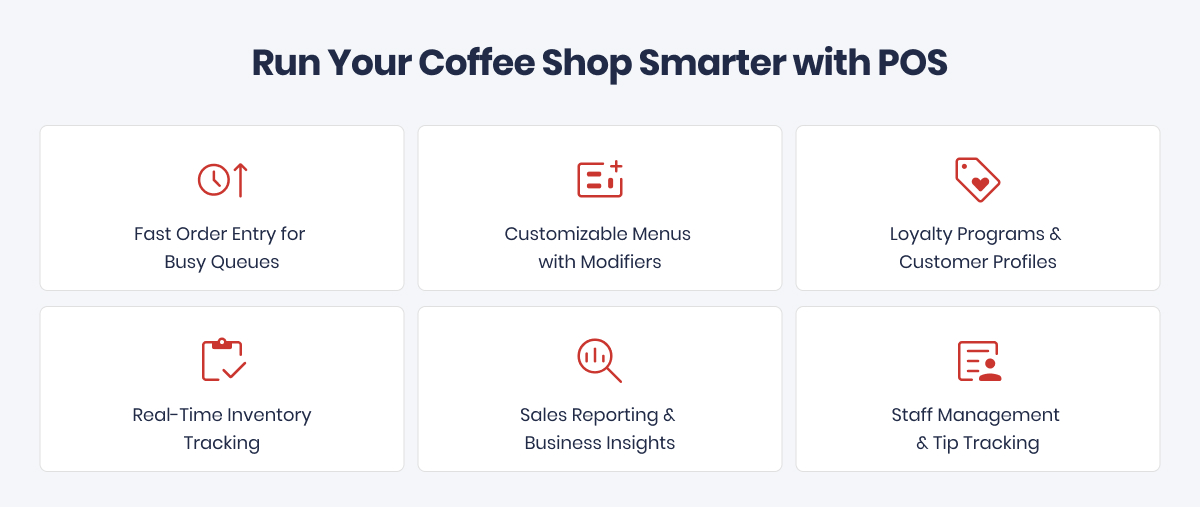
A modern, well-integrated Point of Sale (POS) system is much more than just a digital cash register; it is the operational brain of a coffee shop. A smart point-of-sale system, tailored to the busy café environment, improves customer satisfaction, expedites daily tasks, and establishes the foundation for sustained business expansion.
Here’s how:
1. Fast Order Entry for Busy Queues
Accuracy and speed are crucial in the coffee industry, particularly during busy times like the lunch rush or the morning commute. A POS system designed specifically for cafés streamlines the order-taking procedure with:
- Interfaces optimized for touch for speedy navigation
- Pre-made buttons for popular modifiers and best-sellers
- Using smart combo recognition to bundle or upsell products.
2. Customizable Menus with Modifiers
No two coffees are the same, making it one of the most customized drinks that consumers order. Your point-of-sale system must be able to handle all coffee options, including venti, half-caf, oat milk latte with a single pump of vanilla, and decaf cold brew with light ice.
- Custom modifiers ensure baristas get the details right
- Automatic price adjustments for add-ons or substitutions
- Easy updates to menus for seasonal specials or limited items.
3. Loyalty Programs & Customer Profiles
Gaining new clients is fantastic, but keeping existing ones is even better. CRM (Customer Relationship Management) features and integrated loyalty programs guide you in developing relationships rather than just transactions.
- Digital punch cards that reward repeat visits
- Automatic birthday or milestone offers
- Purchase history to suggest favorite drinks or upgrades.
4. Real-Time Inventory Tracking
Your company’s bottom line can be made or broken by inventory management. Every bag of beans, bottle of syrup, and tray of croissants is tracked in real time by an intelligent point-of-sale system.
- Automatic low-stock alerts prevent runouts
- Integrated vendor ordering streamlines restocking.
5. Sales Reporting & Business Insights
Making data-driven decisions is just as important to running a coffee shop as making excellent espresso. Strong analytics by a café point-of-sale system to assist you in doing so.
- Daily, weekly, and monthly sales reports
- Breakdowns by product, staff member, or time slot
- Trend tracking for menu optimization.
6. Staff Management & Tip Tracking
Strong employee tools in your POS system make managing a dynamic team easier. Establishing systems makes it easier to manage employee performance and satisfaction, whether you’re managing a single location or a chain.
- User-based logins track individual sales and actions
- Shift scheduling and time clock integration
- Tip tracking and pooling for transparent payouts
Best Cafe & Coffee Shop POS Systems to Look for in 2026
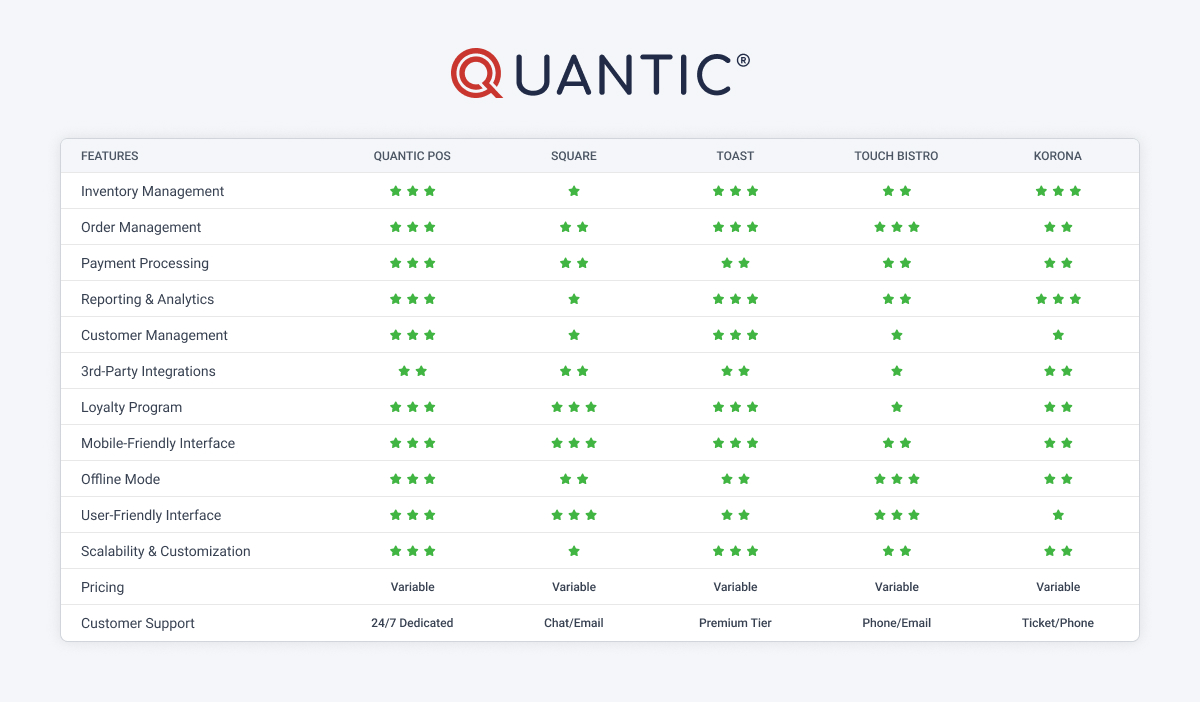
- Quantic POS
| Feature | Quantic POS |
|---|---|
| Best For | Independent cafes, coffee shops, and growing chains |
| Deployment | Cloud-based (iOS & Android) |
| Starting Price | Custom pricing |
| Free Trial | Demo available |
| Hardware Support | Android terminals, tablets, handhelds, receipt printers |
| Payment Processing | Processor-agnostic (supports multiple payment providers) |
| Inventory Management | Advanced inventory with low-stock alerts |
| Menu & Modifiers | Unlimited menu items, sizes, milk options, add-ons |
| Loyalty & CRM | Built-in loyalty and customer management |
| Online Ordering | Yes |
| Kitchen Display System (KDS) | Yes |
| Multi-Location Support | Yes |
| Reporting & Analytics | Real-time sales and business reports |
Quantic POS is a dynamic, cloud-based point-of-sale system designed specifically to meet the needs of the modern hospitality industry.
Quantic offers a cohesive ecosystem that grows with your business, regardless of whether you’re managing a single artisan coffee shop or a chain of boutique cafés. Its versatility enables it to support complex workflows while maintaining an easy-to-use, effective user interface.
It is highly compatible with iOS and Android devices. Quantic is a complete management solution that combines back-end intelligence with front-of-house speed, making it more than just a transaction tool.
It provides everything from smooth online ordering and payment integrations to comprehensive analytics and tools for engaging customers. As a result, it is particularly well-suited for café owners who value both scalability and customization.
Best Suited For:
Boutique roasters, independent coffee shops, and small café chains all need a strong, flexible point-of-sale system that can manage complex operations without affecting ease of use.
Key Features
- Deep Menu Customization
Create menus that reflect the personality of your brand, whether you’re managing a specialty espresso counter or a pour-over bar. Upsells, combo offers, and pricing can all be easily changed. - Powerful Analytics Dashboard
To make wise business decisions, get access to real-time sales data, customer insights, and performance metrics. - Multi-Location Capabilities
For operators who want to expand, managing several cafés from a single dashboard is ideal. - Seamless Online Ordering & Delivery Integration
Sync your point-of-sale system with third-party delivery platforms and online stores without requiring complicated setups or additional tools. - Built-In Loyalty & Rewards Programs
Supports an extensive loyalty program across the entire platform and for multi-location management. - Self-Service Kiosks & Mobile Ordering
Give consumers the ability to self-check out and place handheld orders to expedite service during busy times.
What Makes It Stand Out
Pros:
- A sleek, intuitive interface that makes employee onboarding and training easier.
- Can have Free POS software with no upfront cost via our trusted partner – Pennmark Financial.
- Can get free credit card processing at 0% cost via our trusted partner – Pennmark Financial.
- Manages complicated pricing schemes, package deals, and modifier logic.
- Accepts a wide range of payment methods, including contactless (NFC), QR code scanning, and EMV.
- 24/7 responsive customer service ensures that you’ll never be left without assistance.
- Flexible platform that can be tailored to various service models.
Cons:
- Since standard POS setup can be difficult, most businesses find that Quantic’s onboarding support helps them realize their full potential.
2. Square POS
| Feature | Square POS |
|---|---|
| Best For | Small cafes and startups |
| Deployment | Cloud-based (iOS & Android) |
| Starting Price | Free plan available |
| Free Trial | Free plan |
| Hardware Support | Square Register, Terminal, Stand |
| Payment Processing | Square Payments |
| Inventory Management | Basic inventory |
| Menu & Modifiers | Yes |
| Loyalty & CRM | Available as paid add-on |
| Online Ordering | Yes |
| Kitchen Display System (KDS) | Yes |
| Multi-Location Support | Yes |
| Reporting & Analytics | Real-time dashboard |
Square POS has established a solid reputation as one of the most user-friendly and reasonably priced point-of-sale systems available.
Square is a plug-and-play solution that doesn’t require a significant learning curve or upfront investment, making it perfect for new coffee shops, independent café owners, and mobile vendors.
Best Suited For:
Entrepreneurs, mobile coffee stands, first-time café owners, and single-location operators seeking a simple and affordable point-of-sale system.
Key Features
- Payment Processing
Third-party integrations are not required because credit card processing is integrated. Take chip, swipe, tap, or even mobile wallet payments. - Simple Menu Building
With little setup time, create and arrange your drink menu, modify prices, and add modifiers using the drag-and-drop interface. - Customer Profiles & Loyalty Integration
To encourage repeat business, manage profiles, monitor customer behavior, and, if desired, set loyalty programs into place. - Mobile and Tablet Compatibility
Convert your smartphone or tablet into a fully functional point-of-sale system, ideal for food trucks, pop-up shops, and tiny cafés.
What Makes It Stand Out
Pros:
- Very simple to set up and run
- The basic plan does not require a monthly subscription.
- Smooth interaction between Square’s larger ecosystem (payroll, marketing, appointments, etc.) and POS and payments
- Hardware options are flexible; you can upgrade as you grow or use what you already have.
Cons:
- Due to their relative simplicity, inventory management systems might not be appropriate for cafés with complicated product tracking requirements.
- In high-volume operations, transaction fees can mount up, particularly when contrasted with custom processing rates.
3. Toast POS
| Feature | Toast POS |
|---|---|
| Best For | Busy cafes with food service |
| Deployment | Cloud-based (Android) |
| Starting Price | Custom pricing |
| Free Trial | Demo available |
| Hardware Support | Toast proprietary hardware |
| Payment Processing | Toast Payments |
| Inventory Management | Advanced ingredient inventory |
| Menu & Modifiers | Advanced menu customization |
| Loyalty & CRM | Available as an add-on |
| Online Ordering | Yes |
| Kitchen Display System (KDS) | Yes |
| Multi-Location Support | Yes |
| Reporting & Analytics | Advanced analytics |
One of the most reliable Android-based point-of-sale systems designed specifically for high-demand food service environments is Toast POS.
Toast provides enterprise-grade performance with the adaptability needed by fast-paced, customer-focused operations, whether they are multi-unit franchises or busy urban coffee shops.
Best Suited For:
Busy cafés, drive-thrus, quick-service breakfast restaurants, and expanding café franchises that place a value on scalability, workforce management, and operational speed.
Key Features
- Kitchen Display System (KDS)
Real-time order synchronization between front-of-house and kitchen or barista stations can streamline operations. Reduce prep time and ticket errors during peak hours. - Team Management & Payroll Integration
Eliminate the need for multiple tools by managing payroll processing, time tracking, and employee scheduling all within a point of sale system. - Mobile & Self-Service Ordering
To increase efficiency and reduce wait times, provide customers with self-service kiosks, QR code menus, or smartphone ordering. - Customizable Drink & Order Workflows
To perfectly match the menu style of your café, create complicated ordering paths with modifiers, drink sizes, syrup options, and combo structures.
What Makes It Stand Out
Pros:
- Designed for speed, this product is perfect for environments where throughput and efficiency are crucial.
- All-in-one platform: handles HR and inventory management from one location
- During network problems, dependable offline mode ensures continuous service.
- Adapts well to expanding café operations and multi-location arrangements.
Cons:
- Greater initial expenditure for software and hardware in comparison to more straightforward systems
- Complete use of Toast’s proprietary ecosystem is necessary for optimal performance and features.
- Smaller teams with enterprise-grade systems may face a steeper learning curve.
4. TouchBistro
| Feature | TouchBistro |
|---|---|
| Best For | Table-service cafes |
| Deployment | iPad-based |
| Starting Price | Custom pricing |
| Free Trial | Demo available |
| Hardware Support | iPad hardware |
| Payment Processing | TouchBistro Payments |
| Inventory Management | Available via integration |
| Menu & Modifiers | Yes |
| Loyalty & CRM | Available as an add-on |
| Online Ordering | Yes |
| Kitchen Display System (KDS) | Yes |
| Multi-Location Support | Yes |
| Reporting & Analytics | Built-in reporting |
TouchBistro is a beautifully designed point-of-sale system that runs on iOS and was created especially for the food and beverage sector.
Designed for cafés that prioritize design, smooth service, and an easy-to-use interface, it operates solely on iPads, resulting in a sleek, modern setup that goes well with any elegant, dine-in coffee area.
Best Suited For:
Innovative cafés, companies focused on iOS, and places that provide table service or want to improve the in-person visitor experience.
Key Features
- Optimized iPad-Based Interface
Servers can take orders tableside, reduce wait times, and increase order accuracy. They are lightweight, portable, and easy to use. - Full Offline Functionality
No internet? No issue. During outages, TouchBistro keeps running smoothly, ensuring that service is always available. - Advanced Menu & Modifier Controls
To accommodate even the most specialized coffee or brunch orders, create incredibly detailed menus with customizable combo setups, add-ons, and upsells. - Customer Relationship Tools
Using integrated CRM features, you can store guest profiles, monitor preferences, and provide individualized service.
What Makes It Stand Out
Pros:
- A sleek, modern interface that improves the front-of-house experience
- A mobile, popular setup that is perfect for boutique cafés is made possible by the iPad’s seamless functionality.
- Intelligent staff management features help streamline team coordination.
- Adaptable to different café setups, including full table service and counter service
Cons:
- Only works with iOS devices, which could be limiting for people who don’t use Apple products.
- Numerous advanced functions (such as online ordering, reservations, and loyalty) call for additional add-on purchases.
- Without upgrades, it is less appropriate for enterprise-level or multi-location operations.
5. KORONA POS
| Feature | KORONA POS |
|---|---|
| Best For | Independent cafés, coffee shops, and bakeries |
| Deployment | Cloud-based (Windows, tablet-compatible) |
| Starting Price | Starts at $59/month (Core plan) |
| Free Trial | Demo available |
| Hardware Support | Desktop terminals, tablets, customer-facing displays, barcode scanners, receipt printers |
| Payment Processing | Processor-agnostic (supports multiple payment processors) |
| Inventory Management | Advanced inventory management |
| Menu & Modifiers | Yes |
| Loyalty & CRM | Built-in loyalty and CRM integrations |
| Online Ordering | Yes |
| Kitchen Display System (KDS) | Yes |
| Multi-Location Support | Yes |
| Reporting & Analytics | Real-time cloud reporting. |
The core of the flexible cloud-based point-of-sale system KORONA POS is advanced inventory management.
KORONA is specifically designed for coffee shops that also run a significant retail component, such as those that sell packaged coffee beans, branded merchandise, baked goods, or gift bundles.
This is in contrast to many POS systems that place a higher priority on front-of-house service alone.
Best Suited For:
Any café that oversees a large variety of goods and SKUs across one or more locations, including those with retail shelves, coffee roasters, and bakery/coffee hybrids.
Key Features
- Advanced Inventory Management
Monitor stock levels in real time, set auto-reorder points, and manage both perishable and non-perishable inventory from a single dashboard. - CRM & Loyalty Tools
Utilize customer tracking tools and integrated loyalty programs to create long-lasting connections with customers that boost engagement and promote repeat business. - Promotions & Event Tracking
Use detailed reporting to evaluate their performance, implement targeted discounts, and monitor holiday or seasonal promotions. - Retail-Café Integration
Sell anything from espresso machines to espresso shots with ease using a single system that can manage both retail sales and café service.
What Makes It Stand Out
Pros:
- Outstanding inventory control, perfect for handling merchandise, packaged goods, and ingredients for coffee shops
- Adaptable marketing resources for discounts, bundling, and event-based advertising
- robust data reporting for sales, stock, and employee performance that is cloud-based
- There are no long-term agreements; it is appealing to expanding or seasonal businesses.
Cons:
- Frontline employees may find it less intuitive because it is more aimed toward back-office operations than elegant front-end design.
- Although the interface works well, it is not as well-designed as some of its iPad-based rivals.
- For non-technical users, a feature-rich dashboard might need some training.
6. Lightspeed POS
| Feature | Lightspeed POS |
|---|---|
| Best For | Inventory-focused coffee shops |
| Deployment | Cloud-based (iPad) |
| Starting Price | Custom pricing |
| Free Trial | Yes |
| Hardware Support | iPad POS hardware |
| Payment Processing | Lightspeed Payments & supported providers |
| Inventory Management | Advanced inventory management |
| Menu & Modifiers | Yes |
| Loyalty & CRM | Built-in loyalty and CRM integrations |
| Online Ordering | Yes |
| Kitchen Display System (KDS) | Yes |
| Multi-Location Support | Yes |
| Reporting & Analytics | Detailed business reports |
The advanced cloud-based point-of-sale system Lightspeed Restaurant was created with scalability in mind.
Lightspeed provides the infrastructure to support the next phase of growth, whether you’re managing a flourishing neighborhood café or a rapidly expanding chain.
Best Suited For:
Regional coffee brands, rapidly expanding cafés, and operators running several locations or aiming to expand with a solid operational and digital base.
Key Features
- Ingredient-Level Inventory Tracking
Monitor everything from whole coffee beans to almond milk inventory with precision. Lightspeed helps reduce waste and optimize purchasing decisions. - Omnichannel Capabilities
Integrate your in-store POS system with online ordering, delivery, and even eCommerce platforms to maintain consistent inventory and customer data. - Multi-Location Management
Manage menus, costs, and reporting for multiple café locations from a single dashboard. Get a comprehensive understanding of your brand performance. - Flexible Hardware Options
Use iPads to run your point-of-sale system, or for a more specialized setup, use Lightspeed’s specialized hardware setups.
What Makes It Stand Out
Pros:
- Scalable system designed to manage operations across multiple locations
- Inventory at the ingredient level lowers costs and minimizes shrinkage.
- A sleek, contemporary user interface for both front-of-house and back-office operations
- Combined marketing, loyalty, and e-commerce solutions in a single ecosystem
Cons:
- Pricing might be too complicated or expensive for tiny or frugal cafés.
- There is a learning curve for advanced features; preliminary training is advised.
- Certain features come with more expensive plans, so it’s important to consider the costs carefully.
7. Clover POS
| Feature | Clover POS |
|---|---|
| Best For | Counter-service cafes |
| Deployment | Cloud-based |
| Starting Price | Custom pricing |
| Free Trial | Demo Available |
| Hardware Support | Clover Flex, Mini, Station |
| Payment Processing | Clover/Fiserv Payments |
| Inventory Management | Basic inventory |
| Menu & Modifiers | Yes |
| Loyalty & CRM | Built-in loyalty and CRM integrations |
| Online Ordering | Yes |
| Kitchen Display System (KDS) | Available via apps |
| Multi-Location Support | Yes |
| Reporting & Analytics | Sales dashboard |
For cafés that need to get up and running quickly, Clover POS provides a quick, adaptable, and attractive point-of-sale solution.
For cafés that value speed, mobility, and customer interaction, Clover offers a straightforward yet effective setup with its app-driven software ecosystem and modular hardware options.
Best Suited For:
Food trucks, pop-ups, small-format coffee shops, and cafés that value quick checkouts and customer feedback are examples of businesses seeking a quick, mobile-friendly setup.
Key Features
- Clover Flex Handheld POS
Accept payments and orders anywhere in your café or elsewhere. This multipurpose gadget combines a card reader, barcode scanner, and receipt printer. - Customer Engagement Tools
Launch email promotions, digital gift cards, and loyalty programs with ease directly from the point of sale. - Feedback Collection & Analytics
After a transaction, get immediate feedback from customers to enhance service quality and foster trust. - App Marketplace
Utilize third-party apps that are directly accessible within Clover’s platform to incorporate features like employee scheduling, advanced reporting, online ordering, and more.
What Makes It Stand Out
Pros:
- Lightning-fast setup that requires little onboarding
- Perfect for cafés with limited service areas or for mobile use
- Visually appealing, intuitive interface that is simple for employees to learn
- Numerous integrated features for promotions, gift cards, and loyalty
Cons:
- Restricted flexibility because Fiserv is the main payment processor.
- Paid apps are frequently needed for advanced features (such as inventory tracking, thorough reports, or online ordering).
- Not as adaptable as some other platforms unless third-party apps are used to improve it.
8. Cake POS
| Feature | Cake POS |
|---|---|
| Best For | Full-service restaurants, cafés, coffee shops, and growing restaurant chains |
| Deployment | Cloud-based (Android POS) |
| Starting Price | Custom pricing |
| Free Trial | Demo Available |
| Hardware Support | CAKE POS terminals, handheld devices, receipt printers |
| Payment Processing | Integrated payment processing (CAKE Payments) |
| Inventory Management | Advanced inventory |
| Menu & Modifiers | Advanced menu management |
| Loyalty & CRM | Built-in loyalty and CRM integrations |
| Online Ordering | Yes |
| Kitchen Display System (KDS) | Yes |
| Multi-Location Support | Yes |
| Reporting & Analytics | Real-time sales reports |
A robust cloud-based point-of-sale system designed with efficiency in mind, CAKE POS is perfect for cafés that provide quick service due to high customer volume and peak-hour pressure.
Through features like real-time waitlist tracking, text message notifications, and guest profile management, CAKE, a Sysco product, offers a suite of tools that help manage long lines, coordinate kitchen operations, and improve the guest experience.
Best Suited For:
Fast-paced urban coffee shops, crowded brunch cafés, or any café that encounters crowds and wishes to handle heavy foot traffic with elegance and efficiency.
Key Features
- Order Queue Display & Line Busting
Reduce wait times and congestion during rush hours by using real-time order queues and tools to process orders directly in line. - Text Alerts for Order Pickup
Reduce crowding near the counter and increase pickup efficiency by automatically sending customers an SMS when their orders are ready. - Waitlist and Reservations Management
Integrated waitlist and reservation features help you keep track of table availability, control guest expectations, and lower walkaway rates. - Detailed Guest Profiles
To support loyalty-building and personalize service, record customer preferences, order history, and visit frequency.
What Makes It Stand Out
Pros:
- Designed especially to manage high-volume, quick-turnover service settings
- Front-of-house coordination improves through real-time table management.
- Uses intelligent alerting to streamline the takeout and pickup process.
- A clear, user-friendly interface reduces new hire training time.
Cons:
- When compared to open platforms, third-party integrations may be more restricted or less adaptable.
- Budgeting may be challenging due to the custom pricing model’s lack of upfront transparency.
- It might not be the best option for cafés that require extensive customization or special app integrations.
9. PushPOS
| Feature | PushPOS |
|---|---|
| Best For | Cafés, coffee shops, restaurants, takeaways, and QSRs |
| Deployment | Cloud-based POS |
| Starting Price | Custom pricing |
| Free Trial | Demo Available |
| Hardware Support | POS terminals, tablets, handheld devices |
| Payment Processing | Supports multiple payment providers |
| Inventory Management | Real-time inventory |
| Menu & Modifiers | Real time menu management |
| Loyalty & CRM | Customer loyalty and promotions |
| Online Ordering | Yes |
| Kitchen Display System (KDS) | Yes |
| Multi-Location Support | Yes |
| Reporting & Analytics | Cloud-based real-time reporting |
A high-performance point-of-sale system called PushPOS was created especially for hectic drive-thru and quick-service coffee settings.
PushPOS offers a targeted solution that reduces wait times and increases throughput if your business values speed, efficient workflows, and employee accountability.
Best Suited For:
Fast-casual cafés with little or no dine-in service, quick-service espresso stands, drive-thru cafés, and mobile coffee trucks.
Key Features
- Preset Combos and Rapid Ordering
To manage frequent, repetitive orders, create quick workflows using combo menus and one-touch modifiers. - Labor Optimization Tools
Integrated timekeeping, payroll, and scheduling features allow you to keep track of employee hours, performance, and shift history. - Built-In Loyalty & Analytics
Use loyalty programs to interact with customers and monitor important data on staffing effectiveness, item popularity, and sales performance. - Hardware Flexibility for Drive-Thru Needs
Enables quick, touchless service by supporting contactless payment, outdoor-ready hardware, and dual-screen configurations.
What Makes It Stand Out
Pros:
- Processing orders incredibly quickly for high-volume services
- Outstanding staff management with labor tracking in real time
- Made for small areas, such as trucks and kiosks
- Loyalty programs are available without requiring third-party apps.
Cons:
- Not designed with full-service or dine-in cafés in mind
- Restricted accessibility in certain areas or outside of North America
- Fewer options for customizing the front-end design than systems based on iPads.
10. SpotOn
| Feature | SpotOn POS |
|---|---|
| Best For | Full-service restaurants, cafes, coffee shops |
| Deployment | Cloud-based POS |
| Starting Price | Starts at $0/station/month (All-In plan) or $55/station/month (POS Essentials) |
| Free Trial | Demo Available |
| Hardware Support | SpotOn Station, Handheld, KDS, kiosks |
| Payment Processing | SpotOn Payments |
| Inventory Management | Inventory management through integrations |
| Menu & Modifiers | Advanced menu management |
| Loyalty & CRM | Built-in loyalty and CRM tools |
| Online Ordering | Yes |
| Kitchen Display System (KDS) | Yes |
| Multi-Location Support | Yes |
| Reporting & Analytics | Real-time reporting |
SpotOn is a full-featured point-of-sale platform that integrates customer marketing, team scheduling, and payment processing into a single, cohesive system.
SpotOn was designed with labor-intensive and promotion-driven cafés in mind, making it perfect for companies that manage seasonal workers, student employees, or shifting teams.
Best Suited For:
Campus cafés, coffee shops with seasonal operations, cafés that operate in multiple shifts, or cafés that place a strong emphasis on employee performance, loyalty, and promotions.
Key Features
- Labor & Performance Management
Integrated scheduling and evaluation tools allow you to assign roles, track employee performance, and examine labor costs. - Onboarding and Training Modules
Simplify the hiring and onboarding of new team members; this is best suited for teams with a high turnover rate or those that work part-time. - Integrated Marketing Tools
To boost spend per customer and encourage repeat business, launch targeted email and SMS campaigns straight from your point-of-sale system. - Loyalty and CRM Functionality
Create client profiles, monitor behavior, and provide tailored incentives according to order frequency and history.
What Makes It Stand Out
Pros:
- Great resources for employee analytics and staff management
- Strong integrated marketing and promotion tools
- Robust CRM and loyalty programs to increase client retention
- Scalable for expanding coffee shops with several locations or roles
Cons:
- Adding more services or premium features can quickly increase costs.
- For tiny cafés with little staff, it might be more complicated than is necessary.
- Custom pricing or extra modules are required to access certain features.
11. SkyTab POS
| Feature | SkyTab POS |
|---|---|
| Best For | Restaurants, cafés, coffee shops |
| Deployment | Cloud-based (Android POS platform) |
| Starting Price | Starts at $0 |
| Free Trial | Demo Available |
| Hardware Support | SkyTab POS Workstation, SkyTab Air handheld, SkyTab Glass tablet |
| Payment Processing | Shift4 Payments |
| Inventory Management | Inventory management through integrations |
| Menu & Modifiers | Advanced menu management |
| Loyalty & CRM | Built-in loyalty and CRM tools |
| Online Ordering | Yes |
| Kitchen Display System (KDS) | Yes |
| Multi-Location Support | Yes |
| Reporting & Analytics | Real-time reporting |
SkyTab POS is an affordable POS solution that provides online ordering and marketing tools for cafes and coffee shops. It delivers feature-rich solutions that offer customer management, flexible online ordering, contactless payments, and more.
Best Suited For:
It is best suited for coffee shops, cafes, quick-service, and growing businesses.
Key Features
- QR code Ordering
Customers can easily scan QR codes to view menus, place meal orders, and pay, which helps speed up cafe operations.
- Mobile ordering and payments
It supports mobile ordering, contactless payments, check splitting, and more to offer fast service for cafes, table-side ordering, and on-the-go ordering.
- Marketing and Loyalty
It helps your business create a customer base, run campaigns, and offer reward programs to engage and increase repeat visits.
- Online Ordering and Delivery
It provides flexible online ordering and delivery integration, allowing businesses to accept orders directly on the website, synchronize with POS systems, and integrate with delivery platforms to streamline operations.
What Makes It Stand Out
Pros
- It helps minimize dependency on third-party delivery platforms.
- It is a full-fledged POS solution that provides online ordering, reservations, loyalty, and more.
- It provides a website builder, marketing, and customer engagement features.
- POS comes with mobile ordering and contactless payment capabilities.
Cons
- It relies on specific payment processing rather than being processor-agnostic.
- As compared to a customized POS, it offers limited flexibility.
- It provides third-party integrations using tools.
12. EposNow
| Feature | EposNow POS |
|---|---|
| Best For | Cafes, coffee shops, restaurants |
| Deployment | Cloud-based (Windows, Android & iPad compatible) |
| Starting Price | Software starts at $39/month |
| Free Trial | Demo Available |
| Hardware Support | Epos Now terminals, handhelds, tablets |
| Payment Processing | Epos Now Payments |
| Inventory Management | Advanced inventory |
| Menu & Modifiers | Custom menu management |
| Loyalty & CRM | Built-in loyalty and CRM tools |
| Online Ordering | Yes |
| Kitchen Display System (KDS) | Yes |
| Multi-Location Support | Yes |
| Reporting & Analytics | Real-time reporting |
EposNow is a cloud-based POS for cafes and coffee shops that provides inventory and multi-channel capabilities. It provides an all-in-one platform for cafes that helps them manage their reporting, payments, stock, and integration from anywhere.
Best Suited for:
EposNow is beneficial for mid-sized coffee shops, coffee chains, and businesses that are looking for better inventory management, cloud access, and access to multiple outlets.
Key Features
- Online ordering and sales channels
It provides support for pickup, delivery, and online orders made by customers and synchronizes everything in the POS systems.
- Inventory Management
The POS provides inventory management features that track stock levels in real time and alert when stock is low.
- App Integrations
POS has an app marketplace that helps you connect with accounting, delivery, and loyalty apps.
- Cloud-based POS
Using cloud-based POS allows your business to manage the cafe from anywhere with real-time access to sales, staff, and inventory.
What Makes It Stand Out
Pros:
- It is a cloud-based POS that provides real-time access from any device.
- POS supports inventory management and multiple locations for its customers.
- It is a complete package for cafes that includes POS, payments, inventory, reporting, and more.
Cons
- In this POS, a few integrations and advanced features require more add-ons.
- The UI and setup are quite complex for the freshers.
- The hardware plans and pricing are less transparent for customers.
Final Thoughts
Finding the ideal POS system for your café or coffee shop in 2026 involves more than just chasing features; it also involves determining which one best suits your team, workflow, and expansion objectives.
Your point-of-sale system should make things easier, not harder, whether you’re managing a multi-location coffee chain or a small, corner espresso bar.
Strong inventory tools, real-time analytics, loyalty features, and elegant user interfaces that are all scalable to your company make systems like Quantic POS stand out because they combine simplicity and power.