9 Best POS Systems for Full-Service Restaurants in 2026

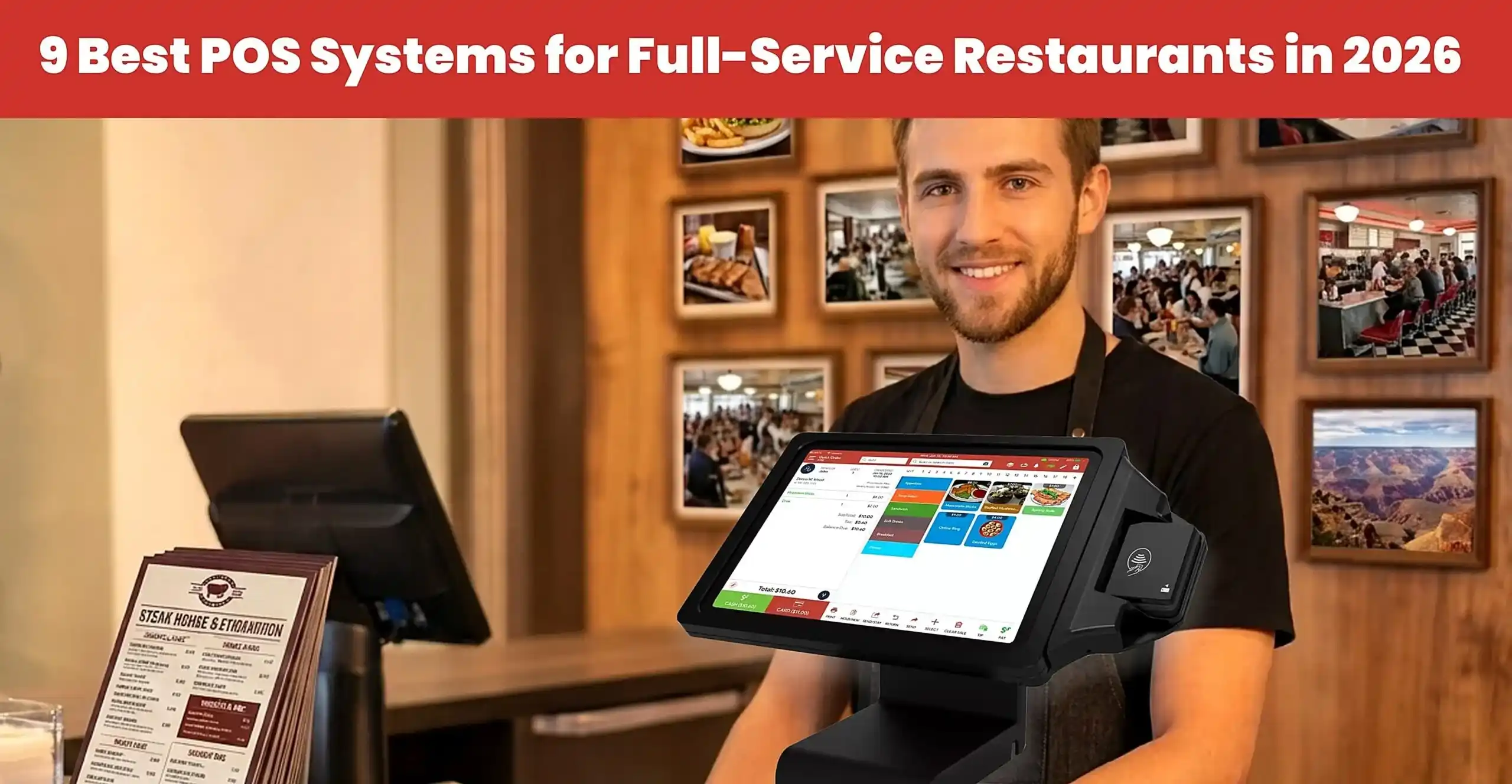
Table of Content
- Quick Answer
- Key Takeaways
- What is a Full Service Restaurant POS
- Ready to Upgrade Your Restaurant POS?
- 9 Best POS Systems for Full-Service Restaurants
- 1. Quantic POS – Best for Flexible Full-Service Restaurant Operations
- 2. Toast – Best for Restaurant-Centric Operations
- 3. Square for Restaurants – Best for Simple Restaurant Operations
- 4. Lightspeed Restaurant – Best for Inventory and Multi-Location Management
- 5. TouchBistro – Best for Table-Service Restaurants
- 6. Clover POS – Flexible POS Hardware
- 7. Revel – Best for Complex Restaurant Operations
- Pricing
- 8. Lavu – Best for Food Service Restaurants
- 9. SpotOn – Best for Integrated Restaurant Management
- How to Choose the Best Full-Service Restaurant POS
- Final Thoughts
- Frequently Asked Questions
When you choose the right POS system for your full-service restaurant, your POS system must have course-based ordering, table management, split checks, payments, inventory, and more restaurant-specific features that keep your service quick and accurate.
In this guide, we are comparing the 9 best full-service restaurant POS systems in 2026, which include Quantic POS, Lightspeed Restaurant, Toast, Square, Clover, TouchBistro, Lavu, Revel, and SpotOn.
What is a Full Service Restaurant POS
A full-service restaurant POS system is a point-of-sale solution designed to manage restaurant operations, including table management, order taking, menu management, billing, payment processing, inventory tracking, and kitchen communication. It helps restaurants streamline service, improve order accuracy, and manage daily operations efficiently.
Key Features of a Full-Service Restaurant POS:
- Table Management: Manage table assignments, reservations, and dining sections.
- Order Management: Take, modify, and track customer orders.
- Menu Management: Update menu items, prices, modifiers, and specials.
- Kitchen Display System (KDS): Send orders directly to the kitchen for faster preparation.
- Reporting & Analytics: Track sales, monitor performance, and review business operations.

9 Best POS Systems for Full-Service Restaurants

1. Quantic POS – Best for Flexible Full-Service Restaurant Operations
Quantic is a cloud-based restaurant POS that is specifically designed for full-service restaurants. It provides support for FOH workflows such as order taking, modifiers, coursing, split checks, payments, customer-facing display, and table management.
It also connects with BOH operations and online ordering. Quantic provides features that manage the server workflow during peak hours. Restaurant staff can choose the service area, table, add the number of guests, build orders, add modifiers, assign courses, and send items to the kitchen.
Key Features
- Table and Floor Management – It manages dining areas and tables within the POS system.
- Order management – It helps create and manage modifiers, table orders, and open checks.
- Course management – It also manages items by course and coordinates with the items when they are sent to the kitchen.
- Split Checks – It allows splitting a guest check evenly or by individual positions.
- Customer display system – It helps customers see their orders, discounts, modifiers, tips, tax, and payment information.
- KDS Integration – It helps to send orders to kitchen displays that enhance servers’ and kitchen staff’s communication.
Benefits
- Supports table-service restaurant workflows
- Table and floor-plan management
- Course and modifier management
- Flexible check-splitting options
- KDS and customer display integrations
- Online ordering capabilities
- Real-time reporting
- Supports multi-location restaurant operations
- Offline functionality for certain POS operations
Pricing
Quantic POS pricing mainly depends on the restaurant’s requirements, which include hardware, payments, features, and more. It provides custom pricing and a tailored setup, so contact Quantic for flexible pricing options.
Best For
Quantic is best for full-service restaurants, independent restaurant operators, table-service restaurants, and more growing restaurants that are looking for a flexible POS solution.

2. Toast – Best for Restaurant-Centric Operations
Toast is a flexible POS system that is designed for full-service restaurants, offering features for payments, kitchen operations, employee management, customer service, online ordering, and more.
It manages tables and orders from the POS, sends orders to the KDS, processes payments, and connects ordering channels.
Key Features:
- FOH – It supports order entry, table management, POS terminals, and payment processing for dining operations.
- BOH – It also supports the restaurant kitchen operations and sends orders directly to the KDS.
- Digital Ordering – It supports online ordering by extending its order beyond the physical store.
- Employee management – It helps with restaurant operations by managing employee workflows.
- Reporting – It provides reporting capabilities that help restaurants review sales and operational data to analyze performance.
- Integrations – It provides the ecosystem that connects with additional restaurant apps and services, allowing restaurants to expand their capabilities.
Pros
- Built specifically for restaurant operations
- Supports both front-of-house and back-of-house workflows
- Combines POS and payment capabilities
- Offers online ordering and delivery functionality
- Includes employee, reporting, and guest engagement tools
- Supports integrations with other restaurant technologies
Pricing
Best For
Toast is best for restaurant-specific POS ecosystems that require core operations, digital ordering, kitchen operations, payments, employee management, and more.
3. Square for Restaurants – Best for Simple Restaurant Operations
Square for Restaurants is a POS solution that is designed for businesses that need core restaurant operations.
It provides full-service restaurants, quick-service restaurants, bars, food trucks, catering businesses, and more.
It combines payments, POS, menus, ordering, and customer and employee management within a single POS system.
Key Features
- Order management – Helps restaurants manage online, in-house, delivery, QR code, and other order types.
- Table management – It lets full-service restaurants manage tables and floor plans, including merging tables for large parties.
- Menu management – It allows restaurants to create and manage menus for POS, online ordering, kiosks, and delivery channels.
- Payment processing – It supports various payment methods and processes payments online, table-side, via QR codes, and offline.
- KDS – It routes tickets to kitchen stations, offering real-time order updates, ticket timers, and synchronizing devices.
Pros
- Straightforward restaurant POS ecosystem
- Supports full-service and quick-service operations
- Integrated payment processing
- Table and floor-plan management
- Online ordering and delivery integrations
- KDS and kiosk options
- Customer loyalty and marketing tools
- Employee management capabilities
- Multi-location and franchise tools
- Offline payment capability
Pricing
Square full-service restaurant pricing mainly depends on processing volume, hardware, selected plan, and additional products. It offers various subscription levels, with Square Pro using custom pricing.
Additional Costs:
- Square KDS: $30/month per device on Plus and $20/month per device on Premium.
- Square Kiosk: $99/month per device on Plus and Premium.
- Payment processing: Transaction fees apply to paid and free plans.
- Hardware: Additional costs depend on the devices selected.
Best For
Square is best for small full-service restaurants, quick-service restaurants, food trucks, and more that want a POS with payments, customer engagement, online ordering, and other products.

4. Lightspeed Restaurant – Best for Inventory and Multi-Location Management
Lightspeed Restaurant POS is designed for full-service restaurants that need POS features like reporting, inventory management, employee management, and multi-location management.
It supports floor plans, table-side ordering, KDS, inventory, integrations, and third-party apps. It is useful for restaurants having multiple business locations.
Key Features
- Menu management – It builds customized menus with items, combos, modifiers, and other menu options.
- Inventory management – It helps to track product stock levels and inventory using Lightspeed inventory tools.
- Reporting and analytics – It provides access to sales, category, product, revenue, and other operational reports.
- Table and Floor management – It provides floor plans, sections, tables, and table status for dine-in service.
- Multi-location management – It offers full-service restaurant POS for multi-location businesses using centralized tools.
Pricing
As of 2026, Lightspeed’s U.S. restaurant pricing page lists:
Pros
- Strong inventory-management capabilities
- Multi-location management tools
- Detailed reporting and analytics
- Customizable menus and floor plans
- Tableside ordering capabilities
- KDS and online ordering options
- Large third-party integration ecosystem
- Offline mode
- Tools designed for growing restaurant operations
Best For
It is best for growing restaurants and multi-location operations that need inventory management, reporting, and POS functionality.

5. TouchBistro – Best for Table-Service Restaurants
TouchBistro is a well-known restaurant POS system that focuses on food service businesses, including table service and full-service operations.
It supports menu management, split bills, table and floor management, reporting, and POS integrations.
Key Features
- Table-side ordering – Helps restaurant staff use mobile POS to take table orders and reduce trips between dining areas.
- Split bills – Split bills evenly or by individual items, supporting groups that want separate payment options.
- Table & Floor plan management – It helps to create and modify floor plans, add tables, and monitor active tables.
- Staff management – It helps the restaurant to manage staff permissions, track their activity, and monitor restaurant operations.
- Reporting and analytics – It provides sales reports, performance reports, and more than 50+ reports.
Pricing
Pros
- Designed specifically for restaurants
- Strong table and floor-plan management
- Tableside ordering
- Flexible bill splitting
- Restaurant-focused menu management
- Staff management and reporting
- Offline functionality
- Online ordering and KDS options
- Reservations, loyalty, and marketing add-ons
- Large restaurant integration ecosystem
Best For
TouchBistro mainly targets independent restaurants, table and full-service restaurants, bars, cafes, and more. Businesses that want restaurant-focused POS with bill splits, menu management, reporting, and more.

6. Clover POS – Flexible POS Hardware
Clover POS is a cloud-based POS system that combines restaurant POS software with various POS hardware. Restaurants can choose various hardware options such as handheld devices, customer displays, terminals, kiosks, and KDS.
For restaurants, Clover offers table mapping, table-side ordering, employee management, reporting, online ordering, and more. It also provides devices such as Clover Mini, Flex, Station Solo, and more.
Key Features
- Order management – It supports item and order management, open tabs, table mapping, discounts, modifiers, and more.
- Multiple POS hardware – It provides handheld and countertop devices such as Flex, Mini, Station Duo, Flex Pocket, and more.
- Table management – It offers full-service restaurant configuration, including split bills, table-side ordering, table management, and more.
- Menu management – It helps restaurants to manage items, modifiers, categories, labels, and stock.
- Table-side ordering – Clover devices like Flex help restaurant staff take orders and payments at the table or anywhere in the restaurant.
Pricing
Pros
- Wide range of POS hardware
- Handheld options for tableside ordering
- Countertop and customer-facing POS options
- Restaurant-specific table management
- Integrated payment processing
- Online ordering capabilities
- Employee management and reporting
- Kiosk and KDS options
- Large third-party app ecosystem
- Flexible configurations for different restaurant formats
Best For
Clover is best for restaurants that want flexible POS hardware solutions. It provides handheld POS options and targets operators that want to extend their system using third-party apps.
7. Revel – Best for Complex Restaurant Operations
Revel POS is a restaurant POS platform mainly designed for businesses that need an order and payment processing solution.
It offers POS, table service, reporting, employee management, customer management, multi-location management, and more.
It is designed for restaurants and growing businesses that manage menus, locations, and daily operations.
Key Features
Table management – It manages tables, dining, layouts, and table service workflows using the POS system.
Inventory management – It helps to track inventory and access stock reporting to enhance kitchen visibility.
Customer Management – It maintains customer information and supports engagement using CRM and loyalty programs.
Reporting and Analytics – It provides access to restaurant reporting to monitor sales, inventory, employees, and other operations.
Multi-location management – It provides centralized management across multiple locations and manages menus, reporting, and operational settings.
Pros
- Designed specifically for restaurant operations
- Strong multi-location management capabilities
- Inventory and stock-management tools
- Table and order management
- Centralized reporting
- Employee-management functionality
- Customer management and loyalty options
- Online ordering and KDS capabilities
- Broad integration ecosystem
- Suitable for restaurant groups with multiple concepts or locations
Pricing
Revel Systems uses customized pricing for POS software, hardware, and payment processing. Third-party sources report software starting at approximately $99 per terminal per month, but actual costs depend on the agreement, hardware, implementation, and selected features. Contact the provider to confirm current pricing and contract terms.
Best For
Revel Systems is best for growing restaurants, multi-location groups, and various other operators that need reporting, inventory, employee management, and integrations.
8. Lavu – Best for Food Service Restaurants
Lavu POS is a restaurant POS system designed for food service businesses that need menu management, employee management, payments, and daily operations.
It supports various restaurant formats, which include full-service restaurants, quick service, bars, cafes, and more.
Key Features
- Menu management – It creates and manages menu items, categories, and modifiers to accommodate different restaurant offerings.
- Inventory management – It allows businesses to monitor stock and support purchasing decisions.
- Order management – It manages orders using POS and helps staff to handle order entry, modifications, and more.
- Payment processing – It helps restaurants accept customer payments using payment processing solutions.
- Reporting and Analytics – It helps businesses review sales and operational data to understand business performance and trends.
Pros
- Restaurant-focused POS functionality
- Order and menu management
- Integrated payment-processing options
- Inventory-management capabilities
- Employee-management tools
- Sales reporting and analytics
- Options for different restaurant formats
- Integration opportunities for additional functionality
Pricing
Best For
Lavu is best for full-service restaurants, bars, cafes, and other food service establishments looking to manage menus, orders, payments, and more.

9. SpotOn – Best for Integrated Restaurant Management
SpotOn is a well-known restaurant technology platform that combines POS, payment processing, online ordering, and more.
It is mainly designed for restaurants that manage daily operations and customer-facing activities using a POS system.
For full-service restaurants, it helps restaurants to manage menus, orders, sales, payments, and encourage repeat visits.
Key Features
- Table management – It helps to view table layouts, manage orders, access open checks, and split checks to accommodate various dining.
- Payment processing – It provides integrated payment solutions to accept payments; its pricing depends on the selected plan.
- Reporting – It helps businesses review sales summaries, payments, employee performance, product performance, and more.
- Menu management – It helps restaurants to create and manage menu items and provide consistent menus across all locations.
- Online ordering – It allows restaurants to accept online orders and support access to pickup and delivery.
Pricing
Pros
- Combines POS and payment processing
- Integrated online ordering capabilities
- Marketing and guest-engagement tools
- Detailed sales and product reporting
- Employee scheduling and labor-management options
- Centralized multi-location management
- Handheld devices for tableside ordering
- Offline operating capabilities
- Additional tools for restaurant profitability analysis
Best For
SpotOn is mainly designed for full-service restaurants, multi-location restaurants, and growing restaurants that combine POS, payments, online ordering, marketing, reporting, and employee management.
How to Choose the Best Full-Service Restaurant POS
Choose Quantic POS if:
you run a full-service restaurant and need flexible restaurant management features, including table management, order management, split billing, kitchen display integration, and reporting.
Choose Toast POS if:
you want a restaurant-focused POS platform with integrated tools for order management, kitchen operations, employee management, and online ordering.
Choose Square POS if:
you operate a small restaurant, café, or independent food business and want an easy-to-use POS with flexible pricing options.
Choose Lightspeed POS if:
you manage a growing restaurant or multiple locations and need advanced inventory management, sales analytics, and centralized operations.
Choose TouchBistro POS if:
you operate a table-service restaurant and want features such as floor-plan management, tableside ordering, and menu management.
Choose Clover POS if:
you want flexible POS hardware options, payment processing capabilities, and access to third-party business applications.
Choose Revel POS if:
you operate a large restaurant or multi-location business that requires centralized management, detailed reporting, and customizable workflows.
Choose Lavu POS if:
you run an independent restaurant, bar, café, or food-service business and need restaurant-focused POS tools.
Choose SpotOn POS if:
you want an integrated restaurant POS with payment processing, marketing, and guest engagement capabilities.